读完这篇你能:区分 subagent 消息的归属,把它的进度转发到前端。
前置:工具调用过程。约 25 分钟。
需求:subagent 作为一个 可以独立执行任务的工具,其执行过程我们也是很关心的。
Agent 调用
效果
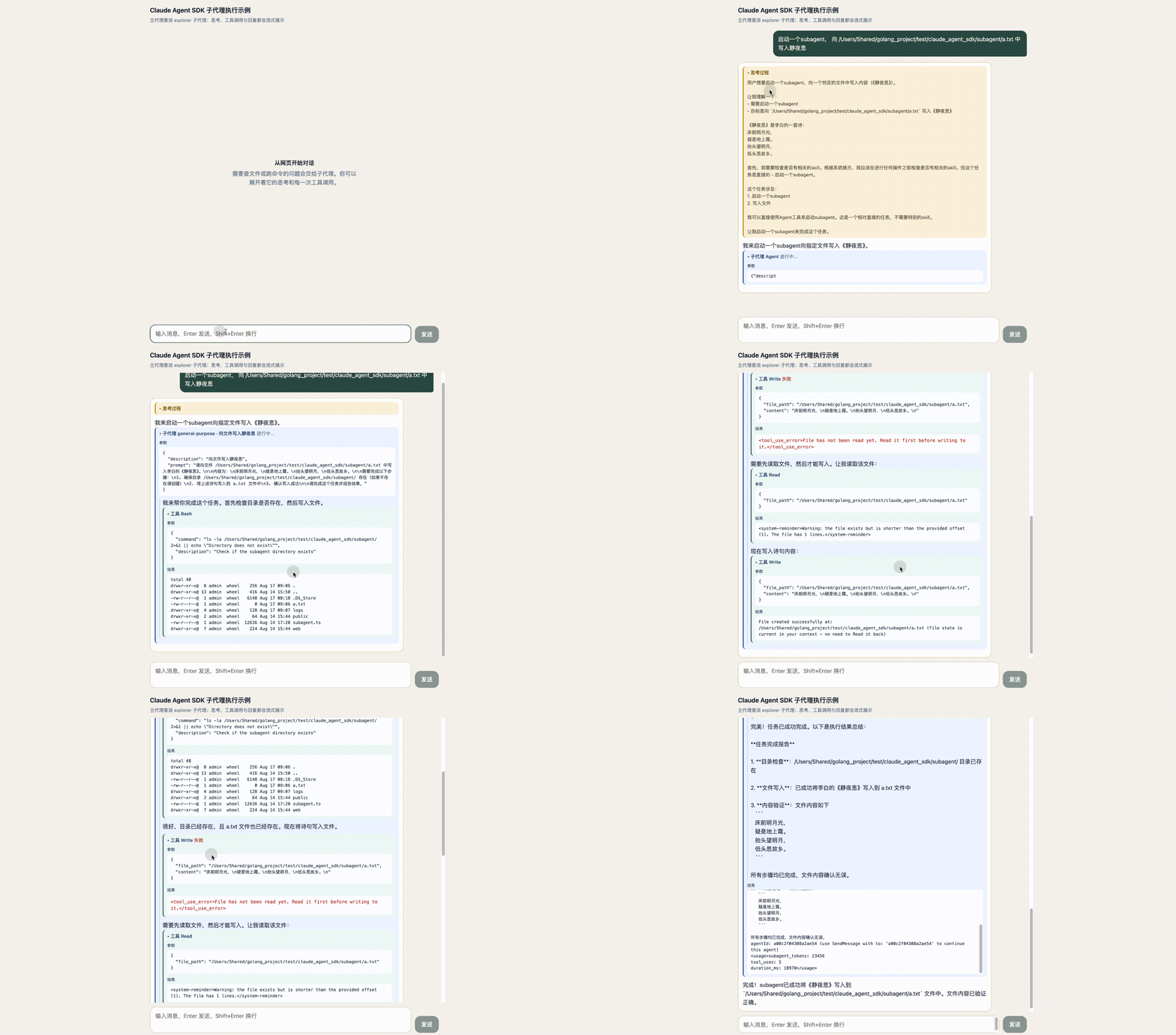
在这个 subagent 的调用中, 该subagent 进行了5次工具调用,工具调用过程穿插了输出块。最后是工具调用结果。
然后,主agent 进行了一个总结。
subagent 消息归属
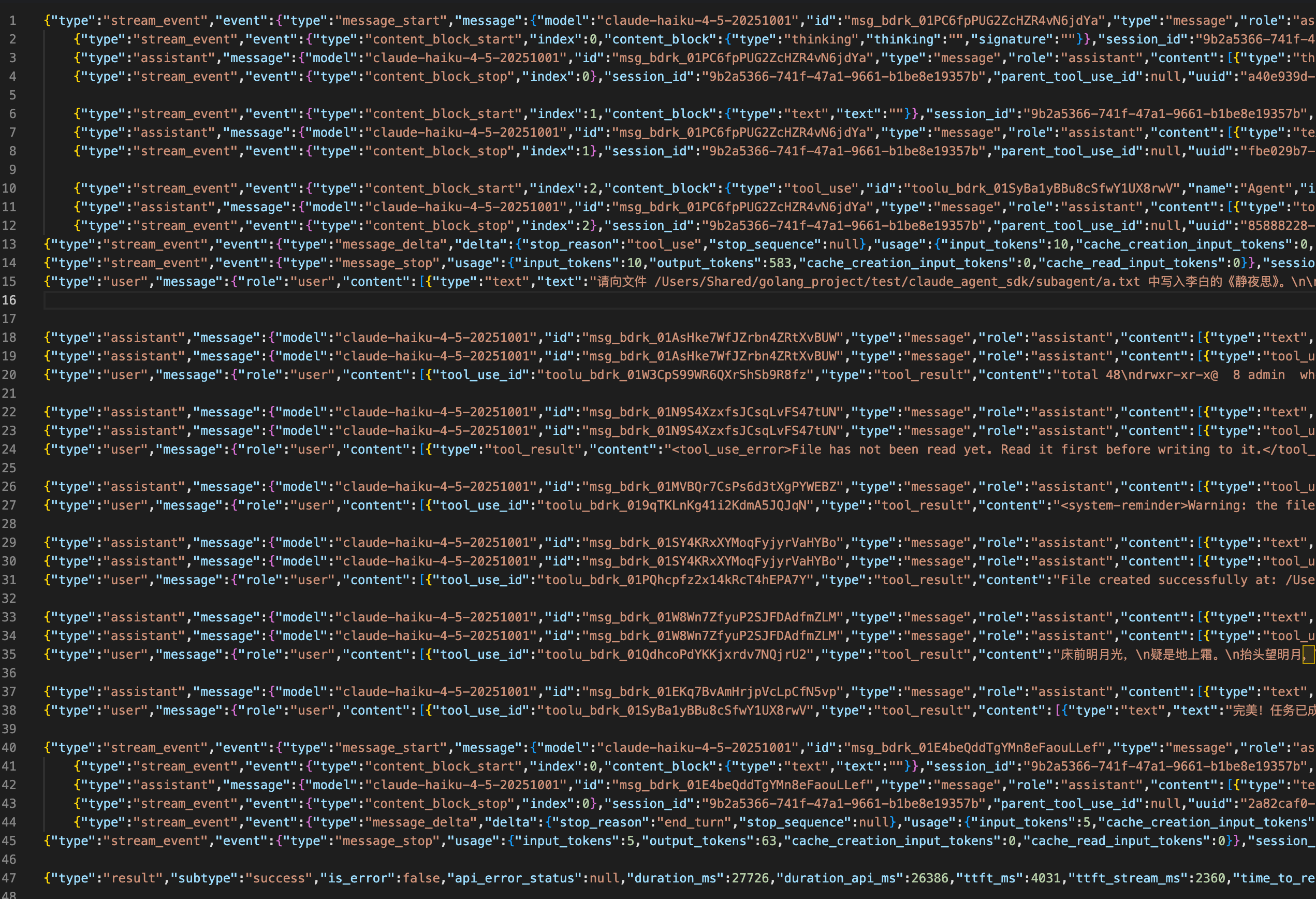
主agent 可以输出一条消息,subagent 也可以输出一条消息。那么如何知道一条消息是属于谁的呢?
主agent在调用时会设置工具调用的id: toolu_bdrk_01SyBa1yBBu8cSfwY1UX8rwV
{
  "type": "stream_event",
  "event": {
    "type": "content_block_start",
    "index": 2,
    "content_block": {
      "type": "tool_use",
      "id": "toolu_bdrk_01SyBa1yBBu8cSfwY1UX8rwV",
      "name": "Agent",
      "input": {}
    }
  },
  "session_id": "9b2a5366-741f-47a1-9661-b1be8e19357b",
  "parent_tool_use_id": null,
  "uuid": "8159a50a-3ea6-4725-bece-a07c02d7d471"
}
Subagent 输出消息时会携带这个id, 字段是 parent_tool_use_id
而且只有subagent 消息的parent_tool_use_id字段会有值
{
  "type": "assistant",
  "message": {
    "model": "claude-haiku-4-5-20251001",
    "id": "msg_bdrk_01AsHke7WfJZrbn4ZRtXvBUW",
    "type": "message",
    "role": "assistant",
    "content": [
      {
        "type": "text",
        "text": "我来帮你完成这个任务。首先检查目录是否存在,然后写入文件。"
      }
    ],
    "stop_reason": null,
    "stop_sequence": null,
    "usage": {
      "input_tokens": 3,
      "cache_creation_input_tokens": 3021,
      "cache_read_input_tokens": 19054,
      "cache_creation": {
        "ephemeral_5m_input_tokens": 3021,
        "ephemeral_1h_input_tokens": 0
      },
      "output_tokens": 1
    },
    "context_management": null
  },
  "parent_tool_use_id": "toolu_bdrk_01SyBa1yBBu8cSfwY1UX8rwV",
  "session_id": "9b2a5366-741f-47a1-9661-b1be8e19357b",
  "uuid": "18f03c53-44fd-411c-a789-f3bac8e844d7",
  "subagent_type": "general-purpose",
  "task_description": "向文件写入静夜思"
}
转发Subagent消息
默认情况下,仅从子代理发出 tool_use 和 tool_result 块。思考块和文本块不会吐出。
可以在 query conds 参数设置 forwardSubagentText = true,子代理的文本和思考块就可以被正常吐出,同时消息中会设置 parent_tool_use_id,以便消费者可以呈现嵌套记录。
Subagent 进度摘要
Subagent 在执行过程中,有时很长一段时间都不调用工具,也没有消息吐出,在前端的表现就像是静默了一样。
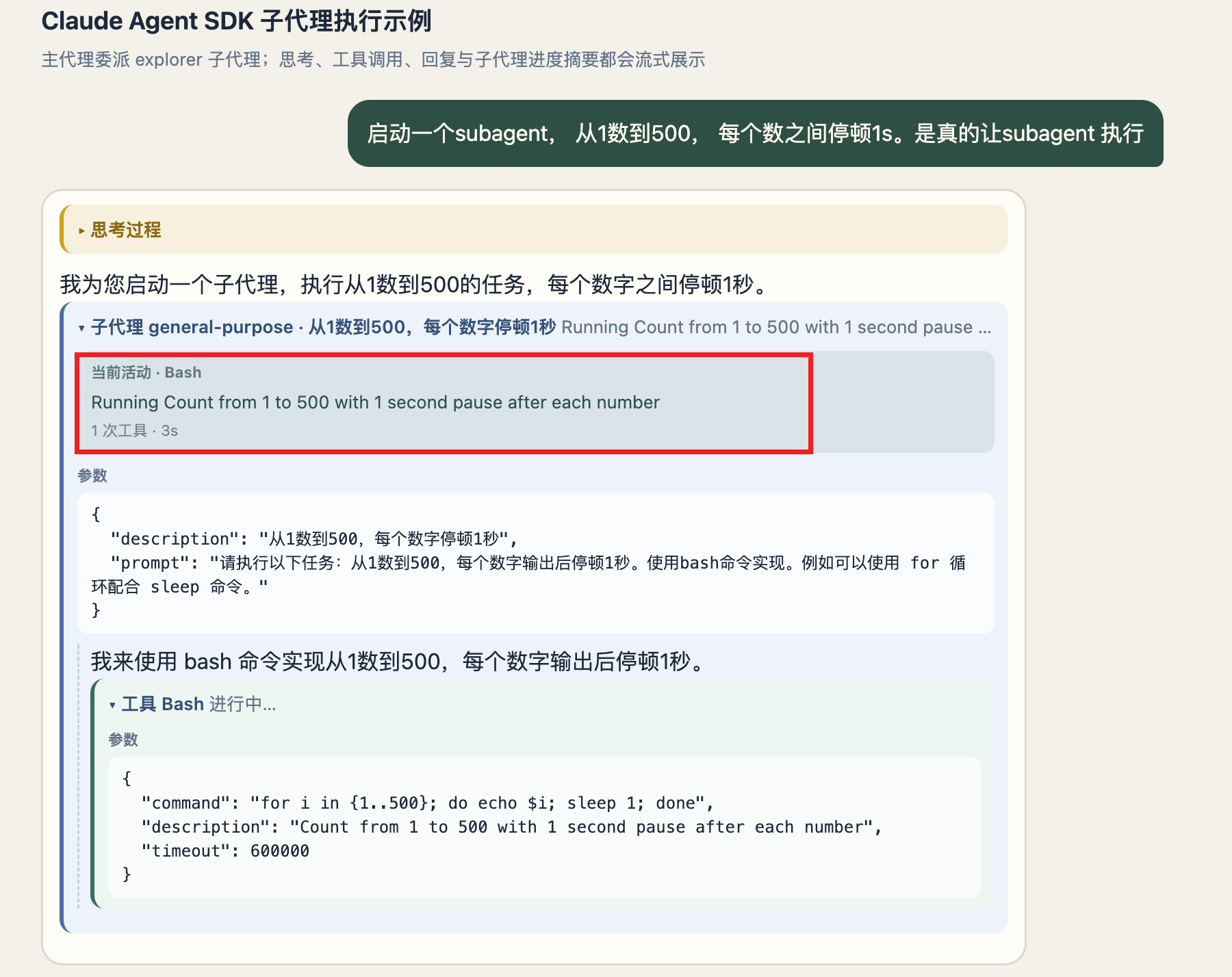
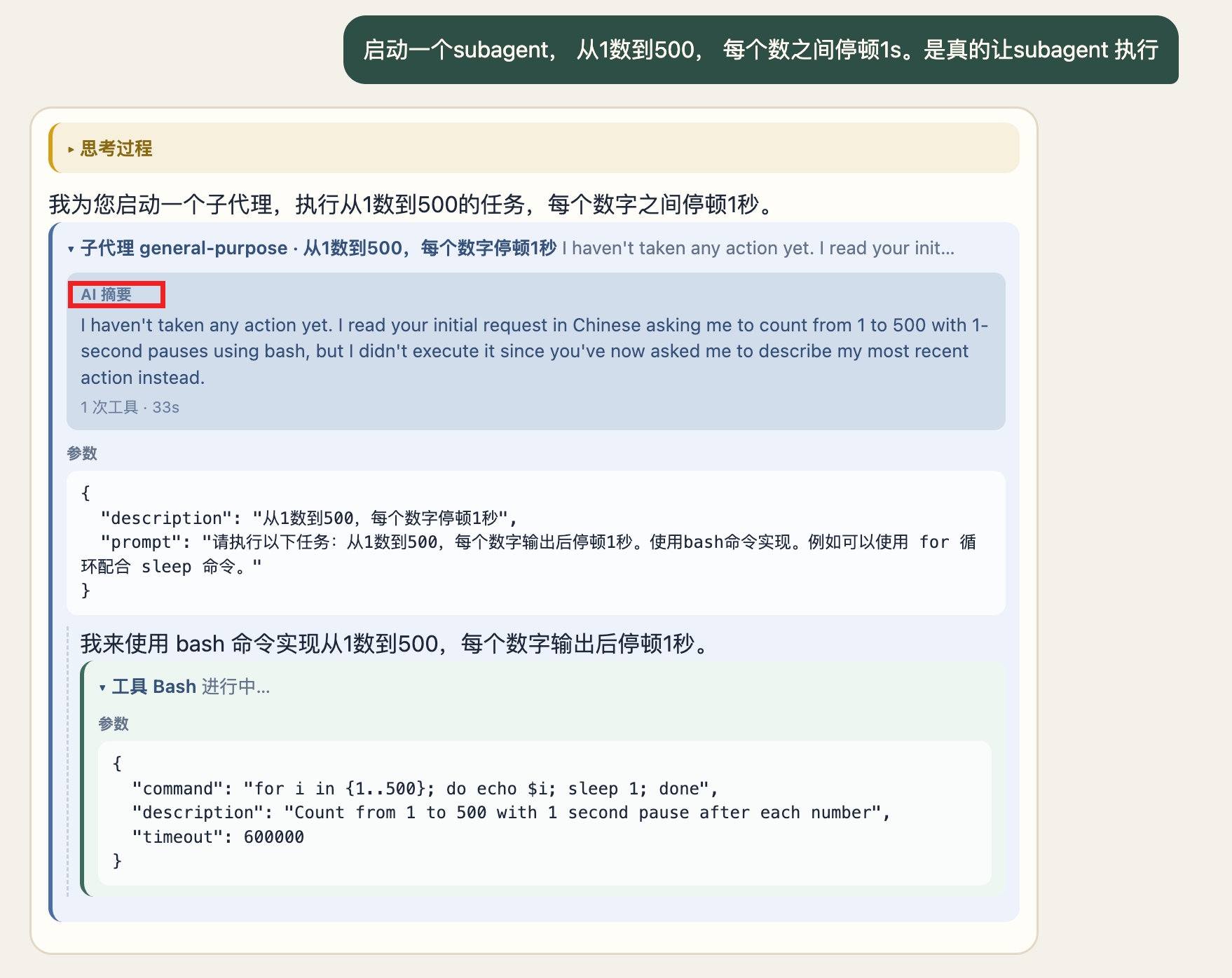
可以在 query conds 参数设置 agentProgressSummaries = true, 主agent 会定时发送subagent 的任务进度摘要消息。
消息
打开 agentProgressSummaries: true 后,
| subagent 消息 | AI 摘要 | |
|---|---|---|
| 触发 | 子代理每次 tool_use,立刻发出 |
默认约 30s 的定时器 |
| 有没有模型调用 | 没有,本地拼文案 | 有,fork 子代理对话打一轮 |
| 特征字段 | last_tool_name + description,无 summary |
有 summary,通常没有 last_tool_name |
| 文案从哪来 | 工具自己的 getActivityDescription,例如 Bash → Running Count from 1 to 100... |
模型按「3–5 个词、现在进行时」生成,例如 Checking script existence |
| 成本 | 免费 | 复用子代理 prompt cache,通常很低 |
判断规则很简单:有 summary 就是 AI 摘要,否则就是 subagent 消息。
如何处理消息
后端不要把两类帧揉成同一个字段。有 summary 可以标 source: 'summary',否则标 source: 'activity'。
这里是为了前端好区分,单独设置了一个source字段。
    if (msg.type === 'system' && msg.subtype === 'task_progress') {
      return [
        {
          type: 'task_progress',
          toolUseId: msg.tool_use_id,
          description: msg.description,
          summary: msg.summary,
          lastToolName: msg.last_tool_name,
          subagentType: msg.subagent_type,
          source: msg.summary ? 'summary' : 'activity',
          durationMs: msg.usage.duration_ms,
          toolUses: msg.usage.tool_uses,
          totalTokens: msg.usage.total_tokens,
        },
      ];
    }
前端按 tool_use_id 挂到对应的 Agent/Task 卡片,不要用进度文案覆盖最初的任务标题:
if (event.summary) {
  tool.progress = event.summary;       // AI 摘要
  tool.progressSource = 'summary';
} else if (event.description) {
  tool.progress = event.description;   // 活动脉冲
  tool.progressSource = 'activity';
}
主 Agent 心跳
主Agent中某个工具跑太久时,大约每 30 秒发一条会发送一条心跳,心跳没有内容,纯为了给前端保活。
    if (msg.type === 'tool_progress' && msg.heartbeat) {
      return [
        {
          type: 'tool_heartbeat',
          id: msg.tool_use_id,
          name: msg.tool_name,
          elapsedSeconds: msg.elapsed_time_seconds,
          parentToolUseId: msg.parent_tool_use_id,
        },
      ];
    }
下一篇:权限配置——让这些工具该放行的放行、该拦的拦住。